You're currently on:
SpringVerb
Vintage spring reverb with SSL control
SSL SpringVerb, part of the SSL ‘Verb’ collection featuring SpringVerb, PlateVerb, and GateVerb, brings the unmistakable vibe of classic spring reverb into your DAW, combining authentic vintage hardware character with modern SSL control. These three plug-ins each deliver distinct sonic textures: spring for retro bounce, plate for smooth studio polish, and gated for dramatic punch. Together, they give producers versatile tools to shape mood, space, and impact across any style of music.
Carefully modelled on the most legendary spring tanks ever built, SpringVerb gives you the authentic tone and texture behind countless classic recordings across rock, pop, electronic music, reggae/dub, and more - perfect for guitars, snares, vocals, keys, and synths.
Spring reverbs naturally emphasise the mid and high frequencies that can quickly take over a mix. SSL SpringVerb gives you precise control over this behaviour, with dedicated damping to tame problem areas before they build up, plus intelligent ducking to keep the effect sitting exactly where you want it. While classic hardware tanks are limited by their physical design, SpringVerb goes further, offering deep, musical parameter control that unlocks sonic shaping impossible on traditional units.
Whether you're adding subtle texture, vintage colour, or full-on dub(plate) pressure, SSL SpringVerb gives you the classic spring sound with deep creative flexibility.
Features
• Delivers the unmistakable sound of vintage spring reverb.
• Three spring models: Find the texture that fits your use-case
• A – Famous Space-age echoes
• B – Classic rackmount spring tank
• C – The go-to choice for dub, used by King Tubby and Lee Perry.
• Spring quantity: Add more springs for more density and complexity
• Adjustable reverb characteristics: Customise time, tension, pre-delay, and stereo width for a level of control not possible with many hardware tanks.
• Tonal control: Add analogue drive, ducking, and dampen frequencies to shape the reverb exactly to your needs.
Controls & Functions:
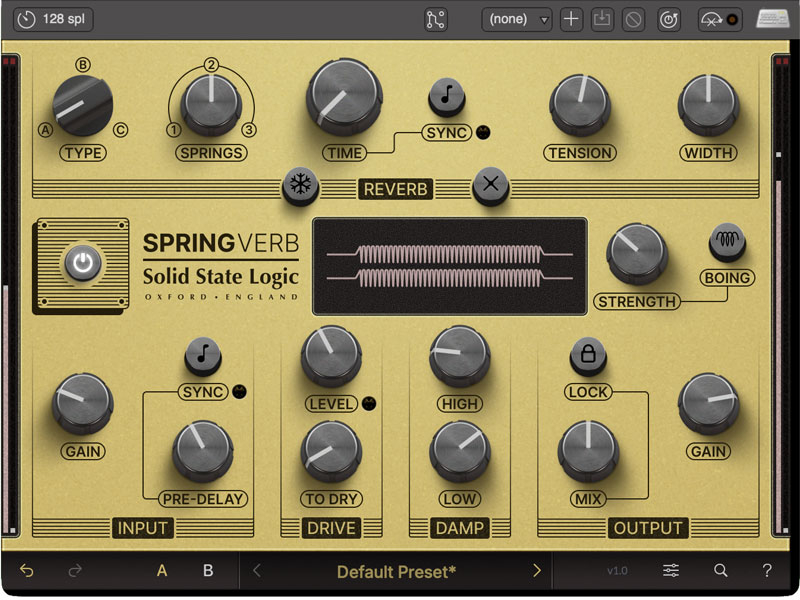
Spring Type
Choose between three distinct types of spring tanks and access a range of tonal characters and decay behaviours:
- A – Famous Space-age echoes
- B – One of Greatest classic rackmount spring tanks
- C – The go-to choice for dub, used by King Tubby and Lee ‘Scratch’ Perry.
Spring Quantity
Smoothly fade the model between single-, double-, and triple-springs. The more springs, the denser and complex the reverb will become.
Reverb Time
The Time knob controls the reverb’s decay length, with the Sync button allowing it to lock to tempo-based values. The Freeze button (snowflake icon) stops new input and creates an infinite reverb tail until turned off. The Kill button (X icon) cuts all input signal while letting the springs fade naturally, and if pressed during Freeze, it also disables Freeze.
Spring Tension
Adjusting the spring tension changes the reverb’s character. Tightening the springs makes the sound travel faster and feel more controlled, while loosening them adds the classic “twanginess” of spring reverbs, with more noticeable bouncing echoes.
Stereo Width
The Width knob can be rotated fully counter-clockwise to reduce the stereo image of the reverb to mono; many spring tanks were wired in mono, so this can be a way to recreate a vintage sound. The stereo image can also be expanded beyond 100% to push the reverb out to the sides of the stereo field.
Spring Tank
At the heart of SSL SpringVerb is the interactive Spring Tank, a visual recreation of what is found on the vintage hardware, that reacts to your settings. The springs expand or contract with the Tension control, and their number changes with the Springs parameter, giving instant feedback as you shape the sound. For creative bursts, set the Strength knob and trigger the Boing button (or click the tank) to unleash a chaotic resonance.
Input Gain
The Gain knob adjusts the signal level entering SSL SpringVerb. The level will affect sections further along in the signal chain, such as the Drive stage .
Pre-Delay
Adding PreDelay to a reverb helps prevent signal masking by keeping the input “dry” before the reverb begins. It can also create a rhythmic slapback effect, and with the Sync button enabled, the PreDelay knob locks to musical values tied to the host tempo.
Drive
The Drive section adds saturation to the input signal, mimicking the harmonic richness of hardware when pushed too loud. Raising the Level knob increases saturation, with the LED indicating when it’s strong. Turning up the To Dry knob replaces the dry output with the saturated signal, useful either as a standalone effect or for previewing the sound that feeds into the spring tank.
Damp Knobs
The Damping Knobs are used to remove certain frequency components from the reverb. Turning up the High knob will remove high frequencies from the reverb, which will make it sound darker, more lo-fi, and vintage. Turning up the Low knob will similarly remove low frequencies from the reverb, useful if the sound is getting too muddy or boomy.
Output Section
The last section is the Output section, consisting of three controls. The Mix knob adjusts the balance between the dry signal (all the way counter-clockwise) vs. the wet/reverb signal (fully clockwise). When using SSL SpringVerb as an insert effect, you'll use the Mix knob to set the right amount of reverb vs the original signal. But when using SSL SpringVerb as a send effect, you'll likely want to set the Mix to the fully clockwise position so only the reverb is heard. Enabling the Lock button above the Mix knob will prevent the knob from changing position when loading different presets. Finally, the total output of SSL SpringVerb is controlled by the Gain knob in this section.
Ducking
Ducking intelligently reduces the reverb output whenever the audio input is present, ensuring dense spring reverb doesn’t mask your instrument or mix. This keeps your sound clear and defined, with the reverb smoothly returning once the input stops. Use Ducking as a precision tool for mix clarity or explore it as a creative effect. Advanced parameters and controls are available via the Advanced Settings button, located alongside the Spring Tank visualizer, giving you detailed control over how Ducking shapes your sound.